macOS Menu Bar App

Stay awake.
Sleep safely.

Snooze Guard keeps your Mac awake during downloads, renders, and presentations — while Auto Eject safely unmounts external drives before sleep to prevent data corruption.

✓ macOS 12+ ✓ Free to Download ✓ Native Swift App
SnoozeDock
SnoozeDock App Interface

Two essential utilities. One elegant app.

SnoozeDock lives quietly in your menu bar — keeping your Mac awake when you need it and protecting your external drives when you don't.

Snooze Guard

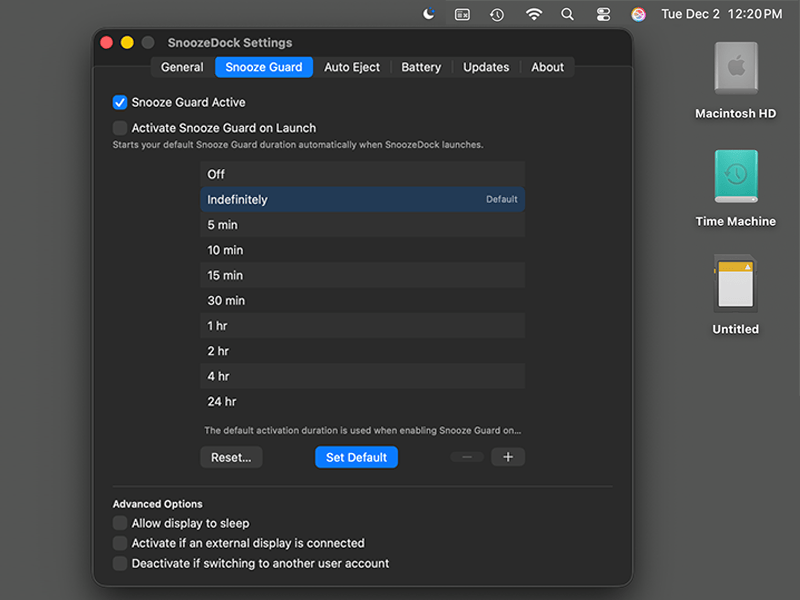
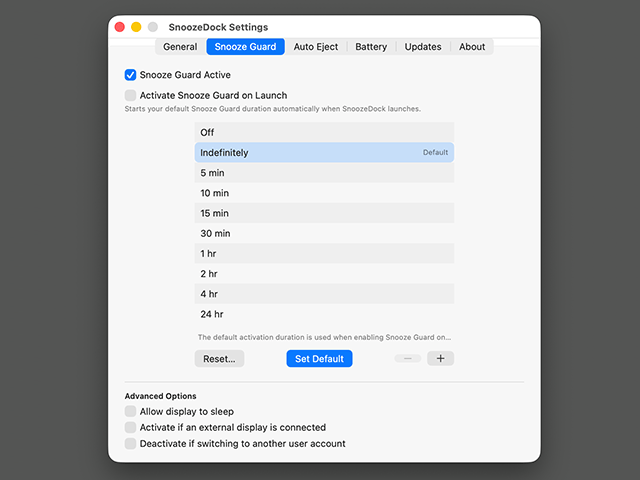
Keep your Mac awake for a specific duration — from 5 minutes to 24 hours, or indefinitely. Perfect for downloads, renders, backups, or presentations.

Auto Eject Before Sleep

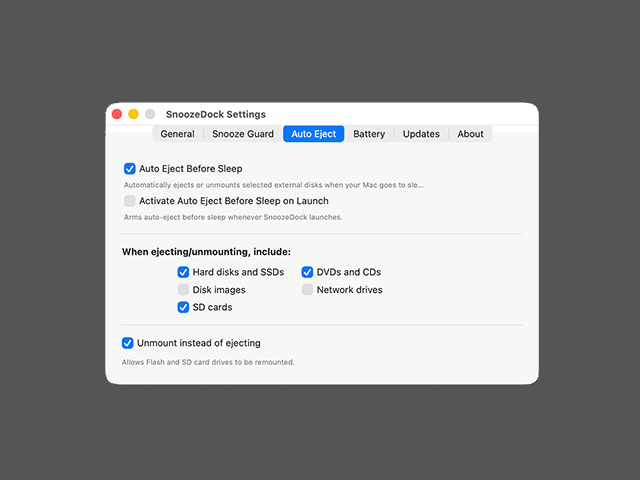
Automatically unmounts external drives when your Mac goes to sleep, preventing the dreaded "Disk Not Ejected Properly" warnings and potential data corruption.

External Display Mode

Automatically activate Snooze Guard when an external display is connected — perfect for clamshell mode or extended desktop setups.

Auto Remount on Wake

When your Mac wakes up, SnoozeDock automatically remounts all previously ejected drives so they're ready to use immediately.

Battery Awareness

Configure Snooze Guard to automatically disable when your battery drops below a threshold or when Low Power Mode is enabled.

Selective Disk Types

Choose exactly which disk types to manage: external HDDs & SSDs, SD cards, disk images, DVDs & CDs, or network drives.

Clean, intuitive interface

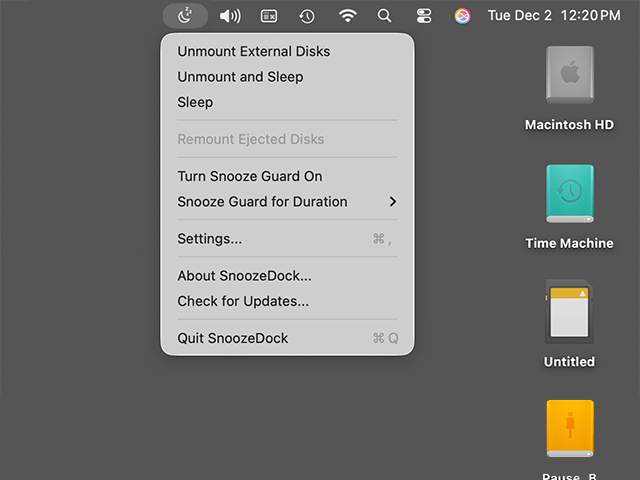
Control Snooze Guard timers and disk management from your menu bar. Configure everything in the elegant settings window.

SnoozeDock App Icon

Download SnoozeDock

Version 0.0.3

Requires macOS 12.0 Monterey or later

Download for macOS

Signed and notarized by Apple

No account required

Free forever

Quick Start

  1. Download and open the DMG file
  2. Drag SnoozeDock to your Applications folder
  3. Open SnoozeDock from Applications (you may need to allow it in System Settings → Privacy & Security)
  4. Click the menu bar icon to configure Snooze Guard and Auto Eject settings

Changelog

Stay up to date with the latest improvements and bug fixes.

v0.0.3 December 2025 Update

Improved Disk Remounting Reliability

  • Better Remount Success Rate — External drives now remount much more reliably when your Mac wakes up, especially USB devices that need extra time to become available
  • Automatic Retry System — If a drive doesn't remount immediately, SnoozeDock will automatically retry multiple times with smart delays, giving your devices time to become ready
  • Smarter Disk Detection — Improved detection finds your drives even when device identifiers change after wake, using multiple strategies to locate and remount them
  • Active Scanning — SnoozeDock now actively scans for available drives before attempting to remount, ensuring it only tries when drives are ready
v0.0.2 December 2025 Update

Improvements & Bug Fixes

  • Improved Sleep Detection — Auto eject now reliably triggers when your Mac is about to sleep
  • Enhanced Remounting — External drives now remount more reliably after wake, with better support for fully ejected disks
  • Notification Fixes — Notifications now display correctly after automatic remount operations
  • UI Improvements — Fixed text wrapping in Auto Eject settings for better readability
v0.0.1 December 2025 Initial Release

🎉 Initial Release

  • Snooze Guard — Keep your Mac awake for configurable durations (5 min to 24 hours) or indefinitely
  • Auto Eject Before Sleep — Automatically eject or unmount selected external disks when your Mac goes to sleep
  • External Display Detection — Automatically activate Snooze Guard when an external display is connected
  • Auto Remount on Wake — Automatically remount previously ejected disks when your Mac wakes up
  • Battery Threshold — Automatically disable Snooze Guard when battery falls below a configurable level
  • Selective Disk Types — Choose which disk types to manage: HDDs/SSDs, SD cards, disk images, DVDs/CDs, network drives
  • Low Power Mode Support — Option to disable Snooze Guard when Low Power Mode is enabled
  • Time Machine Integration — Pauses Time Machine backups before unmounting drives
  • Native Notifications — macOS notifications for all disk and Snooze Guard operations
  • Start at Login — Option to launch automatically when you start your Mac
  • Onboarding Guide — Welcome wizard with safe test unmount/remount functionality
Download Free